 |
Electronic Components Datasheet Search |
|
|
Electronic Components Datasheet Search |
|
OBT350-R101-2EP-IO-1T Datasheet(PDF) 3 Page - Pepperl+Fuchs Inc. |
|
|
|||||||||||||||||||||||||||||
OBT350-R101-2EP-IO-1T Datasheet(HTML) 3 Page - Pepperl+Fuchs Inc. |
|
|
3 / 3 page 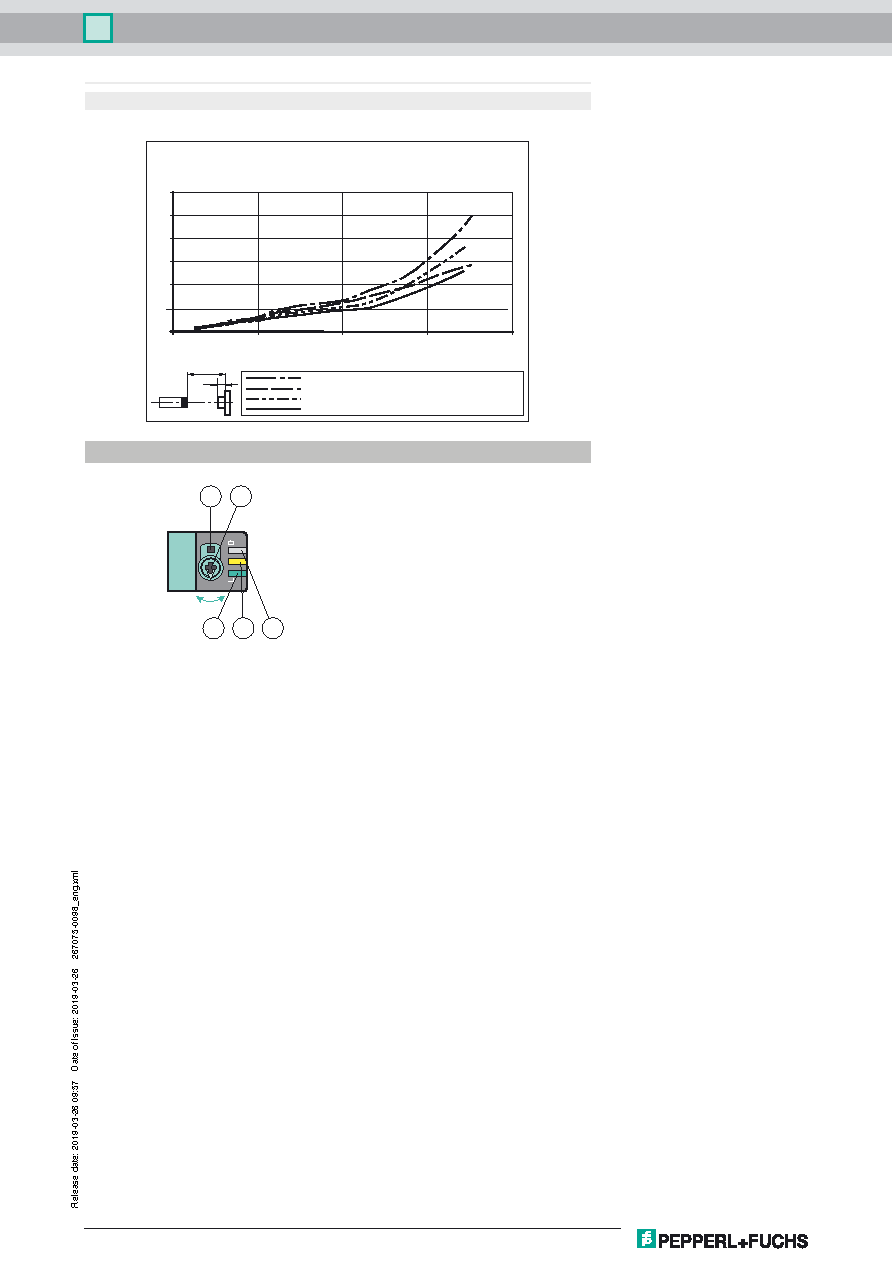 Germany: +49 621 776 1111 Pepperl+Fuchs Group Refer to "General Notes Relating to Pepperl+Fuchs Product Information". USA: +1 330 486 0001 Singapore: +65 6779 9091 www.pepperl-fuchs.com fa-info@us.pepperl-fuchs.com fa-info@sg.pepperl-fuchs.com fa-info@de.pepperl-fuchs.com Triangulation sensor with background evaluation OBT350-R101-2EP-IO-1T 3 To unlock the adjustment functions turn the sensing range adjuster for more than 180 degrees. Sensing Range / Sensitivity Turn sensing range / sensivity adjuster clockwise to increase sensing range / sensitivity. Turn sensing range /sensivity adjuster counter clockwise to decrease sensing range / sensitivity. If the end of the adjustment range is reached, the signal indicator starts flashing with 8 Hz. Light-on / Dark-on Configuration Press the light-on / dark-on changeover switch for more than 1 second (less than 4 seconds). The light-on / dark-on mode chang- es and the operating indicators are activated accordingly. If you press the light-on / dark-on changeover switch for more than 4 seconds, the light-on / dark-on mode changes back to the original setting. On release of the light-on / dark-on changeover switch the current state is activated. Restore Factory Settings Press the light-on / dark-on changeover switch for more than 10 seconds (less than 30 seconds) until all LEDs turn off. On release of the light-on / dark-on changeover switch the signal indicator turns on. After 5 seconds the sensor resumes operation with factory default settings. After 5 minutes of inactivity the sensing range / sensivity adjustment is locked. In order to reactivate the sensing range /sensivity adjustment, turn the sensing range / sensivity adjuster for more than 180 degrees. Cable length 2 m Approvals and certificates UL approval E87056 , cULus Listed , class 2 power supply , type rating 1 1 - Light-on / dark-on changeover switch 2 - Sensing range /sensitivity adjuster 3 - Operating indicator / dark on 4 - Signal indicator 5 - Operating indicator / light on X Y Background on white 90 % / object on black 6 % Background on white 90 % / object on white 90 % Background on black 6 % / object on black 6 % Background on black 6 % / object on white 90 % Object height Y [mm] Distance to the background X [mm] Minimum object height 0 100 200 300 400 30 25 20 15 10 5 0 Functions and Operation R101 1 3 2 5 4 |
|
|
Link URL |
| Does ALLDATASHEET help your business so far? [ DONATE ] |
About Alldatasheet | Advertisement | Contact us | Privacy Policy | Link to Datasheet | Link Exchange | Manufacturer List All Rights Reserved©Alldatasheet.com |
| Russian : Alldatasheetru.com | Korean : Alldatasheet.co.kr | Spanish : Alldatasheet.es | French : Alldatasheet.fr | Italian : Alldatasheetit.com Portuguese : Alldatasheetpt.com | Polish : Alldatasheet.pl | Vietnamese : Alldatasheet.vn Indian : Alldatasheet.in | Mexican : Alldatasheet.com.mx | British : Alldatasheet.co.uk | New Zealand : Alldatasheet.co.nz |
|
Family Site : ic2ic.com |
icmetro.com |
 Indian ▼
 English
 Chinese
 German
 Japanese
 Russian
 Korean
 Spanish
 French
 Italian
 Portuguese
 Polish
 Vietnamese
 Indian
 Mexican
 British
 New Zealand


