 |
Electronic Components Datasheet Search |
|
|
Electronic Components Datasheet Search |
|
LEDV3 Datasheet(PDF) 13 Page - Midas Components |
|
|
|||||||||||||||||||||||||||||
LEDV3 Datasheet(HTML) 13 Page - Midas Components |
|
|
13 / 13 page 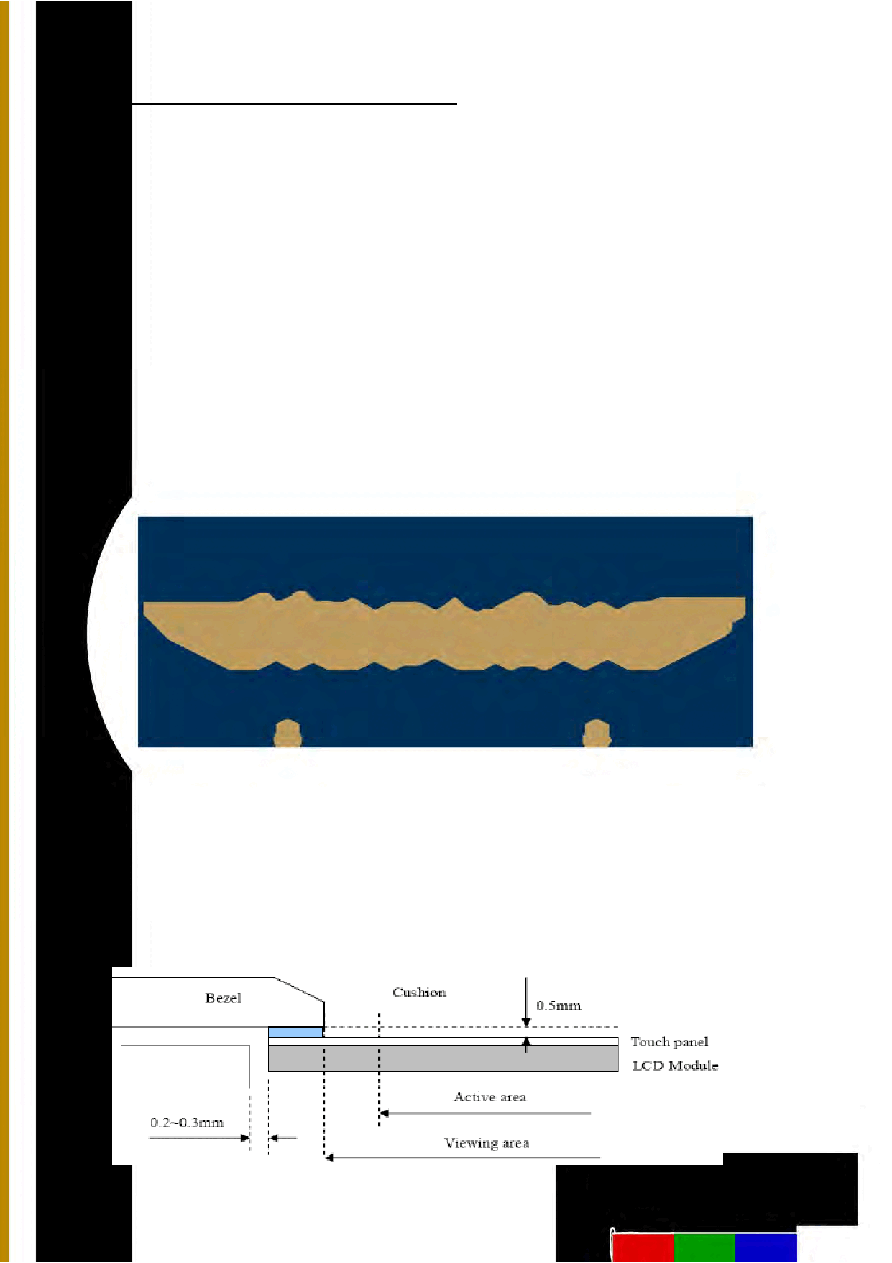 11. Precautions for Use of LCD Modules 11.1 Safety The liquid crystal in the LCD is poisonous. Do not put it in your mouth. If the liquid crystal touches your skin or clothes, wash it off immediately using soap and water. 11.2 Handling A. The LCD and touch panel is made of plate glass. Do not subject the panel to mechanical shock or to excessive force on its surface. B. Do not handle the product by holding the flexible pattern portion in order to assure the reliability C. Transparency is an important factor for the touch panel. Please wear clear finger sacks, gloves and mask to protect the touch panel from finger print or stain and also hold the portion outside the view area when handling the touch panel. D. Provide a space so that the panel does not come into contact with other components. E. To protect the product from external force, put a covering lens (acrylic board or similar board) and keep an appropriate gap between them. F. Transparent electrodes may be disconnected if the panel is used under environmental conditions where dew condensation occurs. G. Property of semiconductor devices may be affected when they are exposed to light, possibly resulting in IC malfunctions. H. To prevent such IC malfunctions, your design and mounting layout shall be done in the way that the IC is not exposed to light in actual use. 11.3 Static Electricity A. Ground soldering iron tips, tools and testers when they are in operation. B. Ground your body when handling the products. C. Power on the LCD module before applying the voltage to the input terminals. D. Do not apply voltage which exceeds the absolute maximum rating. E. Store the products in an anti-electrostatic bag or container. 11.4Storage A. Store the products in a dark place at +25℃±10℃ with low humidity (40% RH to 60% RH). Don't expose to sunlight or fluorescent light. B. Storage in a clean environment, free from dust, active gas, and solvent. 11.5 Cleaning A. Do not wipe the touch panel with dry cloth, as it may cause scratch. B. Wipe off the stain on the product by using soft cloth moistened with ethanol. Do not allow ethanol to get in between the upper film and the bottom glass. It may cause peeling issue or defective operation. Do not use any organic solvent or detergent other than ethanol. 11.6 Cautions for installing and assembling Bezel edge must be positioned in the area between the Active area and View area. The bezel may press the touch screen and cause activation if the edge touches the active area. A gap of approximately 0.5mm is needed between the bezel and the top electrode. It may cause unexpected activation if the gap is too narrow. There is a tolerance of 0.2 to 0.3mm for the outside dimensions of the touch panel and tail. A gap must be made to absorb the tolerance in the case and connector. In order to make the display assembly stable and firm, Midas recommends to design some supporting at the display backside, especially for the display with tape-attached touch panel, such supporting is important and essential, or else, the display may drop-off from front after some period of time. Page 13 of 13 |
|
|
Link URL |
| Does ALLDATASHEET help your business so far? [ DONATE ] |
About Alldatasheet | Advertisement | Contact us | Privacy Policy | Link to Datasheet | Link Exchange | Manufacturer List All Rights Reserved©Alldatasheet.com |
| Russian : Alldatasheetru.com | Korean : Alldatasheet.co.kr | Spanish : Alldatasheet.es | French : Alldatasheet.fr | Italian : Alldatasheetit.com Portuguese : Alldatasheetpt.com | Polish : Alldatasheet.pl | Vietnamese : Alldatasheet.vn Indian : Alldatasheet.in | Mexican : Alldatasheet.com.mx | British : Alldatasheet.co.uk | New Zealand : Alldatasheet.co.nz |
|
Family Site : ic2ic.com |
icmetro.com |
 Indian ▼
 English
 Chinese
 German
 Japanese
 Russian
 Korean
 Spanish
 French
 Italian
 Portuguese
 Polish
 Vietnamese
 Indian
 Mexican
 British
 New Zealand


